What Is ZeroClaw? A Plain-English Introduction
Start here. What the runtime actually does, who it is for, and how the pieces fit together — no prior knowledge assumed.
ZeroClaw is an open-source runtime for autonomous AI agents, written in Rust. It runs in under 5MB of RAM, starts in milliseconds, and ships as a single binary that works on everything from a server to a $10 ARM board.
ZeroClaw is a runtime framework for agentic workflows. That phrase does a lot of work, so here is the concrete version: an AI agent needs four things to be useful — a model to think with, somewhere to remember what happened, tools it can act through, and a channel a human can reach it on. ZeroClaw provides all four behind swappable interfaces, so you describe your agent once and change the model, the storage backend or the messaging app underneath it without rewriting anything.
What separates it from comparable projects is what it costs to keep running. Most agent runtimes are built on Node.js or Python, which means a language runtime sitting in memory consuming hundreds of megabytes before your agent has done a single thing. ZeroClaw is compiled Rust with no garbage collector and no interpreter, so an idle agent occupies a few megabytes and starts in single-digit milliseconds.
That difference is not academic. It is the difference between needing a Mac mini and needing a Raspberry Pi Zero — between one agent per machine and twenty. If you want the longer version, read our full introduction to ZeroClaw.
A resident footprint under 5MB and a 3.4MB binary. You can run a dozen agents on hardware that would struggle to start one Node-based runtime, and you stop having to think about whether a machine can afford to host one.
The runtime will happily live on a $10 ARM board. Pair it with a local model through Ollama and the marginal cost of running an agent drops to the electricity it draws — no per-token billing, no subscription.
Cold start is measured in milliseconds rather than seconds, even on slow cores. That makes it practical to start an agent on demand instead of keeping a daemon warm purely to avoid a painful boot.
One self-contained binary covers ARM, x86 and RISC-V. There is no interpreter to install, no dependency tree to resolve and no version manager to fight — you copy a file to the machine and run it.
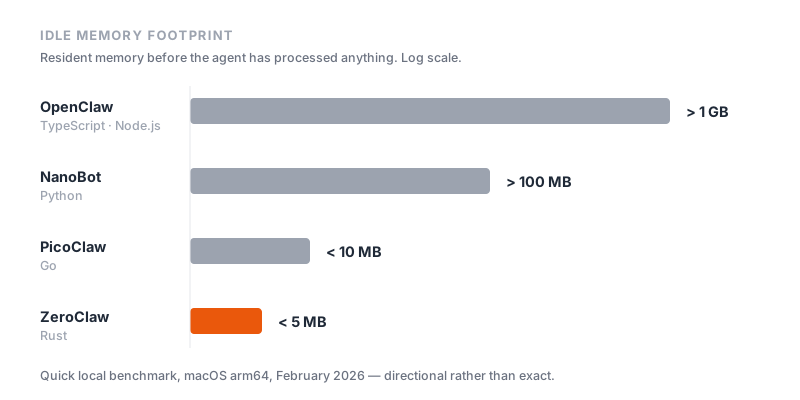
The table below is a quick local benchmark run on macOS arm64 in February 2026, normalised for 0.8GHz edge hardware. Treat it as an order-of-magnitude guide rather than a precise measurement — your numbers will vary with build flags and hardware.
| Metric | OpenClaw | NanoBot | PicoClaw | ZeroClaw |
|---|---|---|---|---|
| Language | TypeScript | Python | Go | Rust |
| Resident memory | > 1GB | > 100MB | < 10MB | < 5MB |
| Startup (0.8GHz core) | > 500s | > 30s | < 1s | < 10ms |
| Binary size | ~28MB distribution | Scripts, no binary | ~8MB | 3.4MB |
| Runtime dependency | Node.js (~390MB) | Python interpreter | None | None |
| Viable hardware | Mac mini, ~$599 | Linux SBC, ~$50 | Linux board, ~$10 | Any board, ~$10 |
Detailed head-to-head breakdowns: OpenClaw vs ZeroClaw, ZeroClaw vs PicoClaw, and the three-way 2026 comparison.
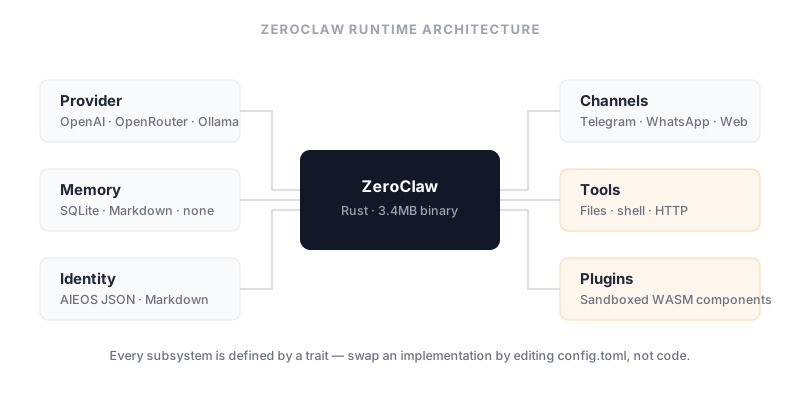
ZeroClaw is built around traits — Rust’s version of interfaces. Every subsystem is defined by a contract rather than a concrete implementation, which is what makes the parts interchangeable. The memory provider, the model provider, the messaging channel and the tool executor are all pluggable, and swapping one is a configuration change rather than a code change.
Provider  <--->  [ Runtime Adapter ]  <--->  Channel
                        ^
Memory    <--->  [ Security Policy ]  <--->  Tools
                        v
Observer  <--->  [ Identity Config ]  <--->  Tunnel
The practical consequence is that you can develop against a cheap local model and move to a frontier hosted model in production by editing one line of config.toml, with no change to the agent itself.
An autonomous agent that can read files and run commands is a genuine risk, and ZeroClaw treats it as one. Four controls do most of the work:
git, cargo, whatever the job needs — can be invoked.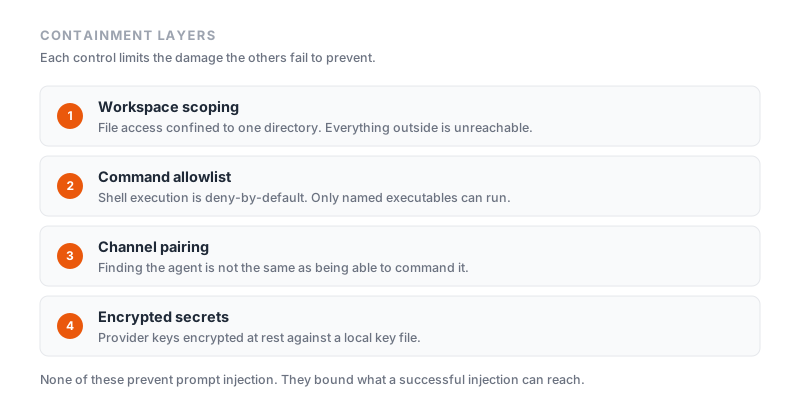
Defaults are sensible but not sufficient on their own. Our guide to the ZeroClaw security model covers what each control does and does not protect against, and how to tighten them.
Two separate extension mechanisms are easy to confuse. Skills are instructional: a folder containing a SKILL.md file whose frontmatter declares a name, description, version, category and the permissions it needs, followed by instructions the agent reads when the skill is triggered. They change what the agent knows how to do.
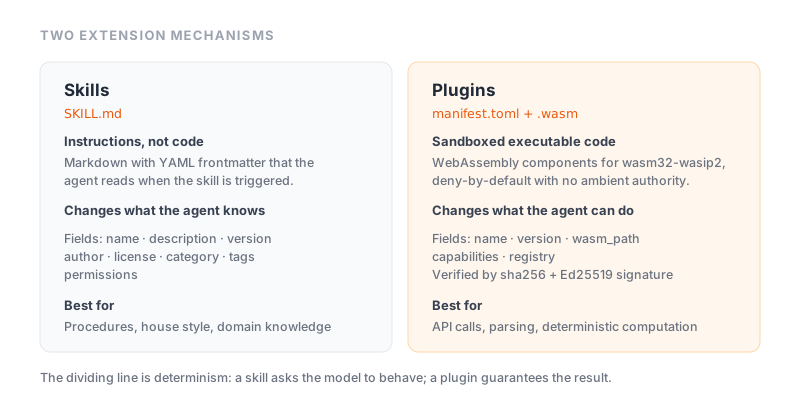
Plugins are executable: WebAssembly components compiled for wasm32-wasip2, which run sandboxed and deny-by-default, receiving only the capabilities their manifest.toml declares. They change what the agent can actually do. Both install from the command line, and both are covered in our skills and plugins guide.
Start here. What the runtime actually does, who it is for, and how the pieces fit together — no prior knowledge assumed.
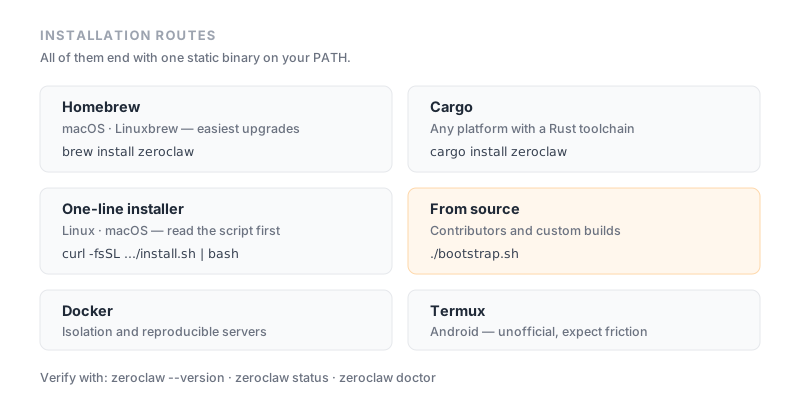
Every supported installation route, the differences between them, and how to verify the install actually worked.
The four controls that stand between an autonomous agent and your filesystem, and how to configure each one properly.
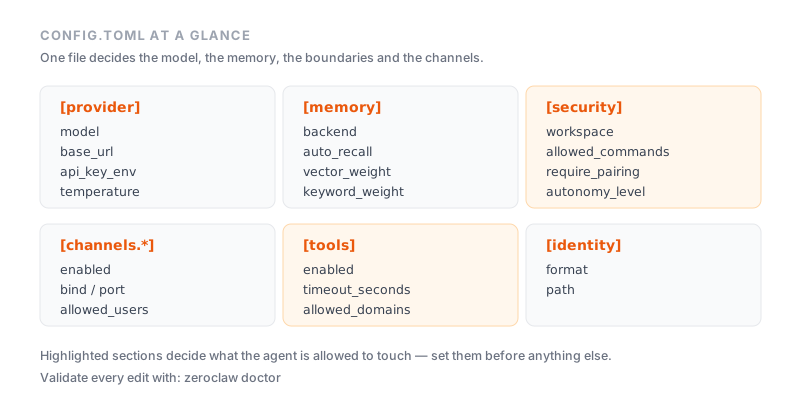
Every section of the configuration file explained, with complete working examples for local and hosted models.
How SKILL.md files extend an agent's behaviour, how WASM plugins differ, and how the permission model governs both.
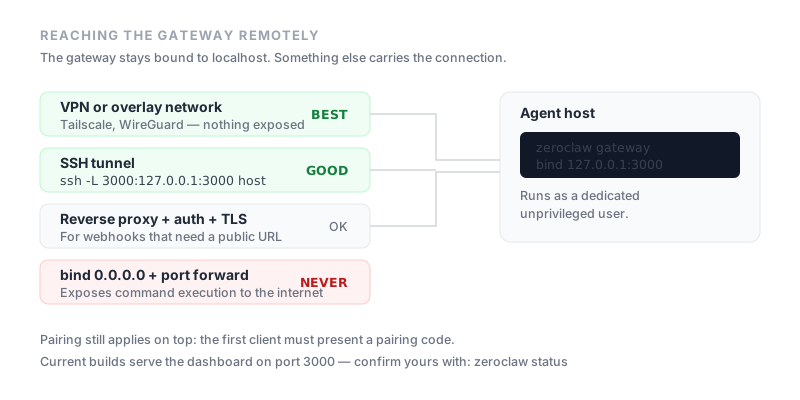
Running the web dashboard, exposing the gateway safely, and what the pairing code protects you from.
A fully local agent you can message from your phone, with no API key and no cloud dependency.
What actually happens when you put a Rust agent runtime on the cheapest board Raspberry Pi sells.
ZeroClaw is an open-source runtime for AI agents, written in Rust. It provides the plumbing an agent needs — a model provider, memory, tools, and a messaging channel — behind swappable interfaces, so an agent can be defined once and run anywhere. Its defining characteristic is size: the runtime targets a memory footprint under 5MB and ships as a single static binary.
No. They solve a similar problem but are separate projects with different implementations. OpenClaw is written in TypeScript and runs on Node.js; ZeroClaw is written in Rust and compiles to a standalone binary with no runtime dependency. ZeroClaw ships a migration path that can import an existing OpenClaw setup.
ZeroClaw builds for macOS (Apple Silicon and Intel), Linux and Windows, and because it is a static binary it also targets ARM, x86 and RISC-V boards. Android is possible through Termux. See our installation guide for the exact steps on each platform.
No. ZeroClaw talks to any OpenAI-compatible endpoint, so you can point it at OpenRouter, OpenAI, Anthropic, or a fully local server such as Ollama. Running a local model means no API key and no per-token cost at all.
The runtime itself is the cheap part — a few megabytes of RAM and storage, which a Raspberry Pi Zero or a $10 ARM board can supply. The real requirement comes from the model. A hosted API needs almost nothing locally; running a local model through Ollama needs enough RAM to hold that model, typically 4GB or more.
Through four layers: workspace scoping restricts file access to a single directory, a command allowlist means only explicitly permitted executables can run, new channel connections require a pairing code, and API keys are encrypted at rest. Our security guide walks through how to configure each one.
The runtime is open-source and free to run. Your only cost is whatever your model provider charges — which is zero if you run models locally — plus the hardware you run it on.