ZeroClaw vs OpenClaw vs PicoClaw: which would I use?
I start with the requirements below. My choice depends on the integration I need, the machine I can maintain and where the model will run.
Updated · Versions: ZeroClaw 0.8.5, OpenClaw 2026.10.1, PicoClaw 0.3.1 · Independent community comparison
Requirements first
On smaller screens, swipe the table sideways. These are version-specific requirements and fit criteria, not performance rankings.
| Requirement | ZeroClaw 0.8.5 | OpenClaw 2026.10.1 | PicoClaw 0.3.1 |
|---|---|---|---|
| Best reason to shortlist | I want a native Rust runtime with explicit agent and risk-profile configuration. | I need its assistant workflows, messaging integrations or companion-device features. | I want a Go runtime and its documented CLI, launcher or small Linux device deployment path. |
| Install requirement | A release asset matching my OS and CPU; dashboard assets for the web UI. Rust tooling for source builds. | A supported Node runtime for the npm route: >=24.16.0 <25 or >=26.1.0 in this release. | A release asset matching my OS and CPU. Go 1.25+ for source builds; the web launcher has separate build steps. |
| Configuration | Schema-3 TOML: providers, named agents, workspaces and risk profiles. | JSON/JSON5: Gateway, agents, providers, tools and channels. | JSON: model_list, agent defaults, workspace and tools. PICOCLAW_HOME and PICOCLAW_CONFIG isolate state. |
| Model requirement | A compatible hosted provider or a separately running local model server. | A compatible hosted provider or a separately running local model server. | A compatible hosted provider or a separately running local model server. |
| RAM and hardware | Size the agent, enabled tools and model server separately. I have no measured minimum here. | Budget for Node, the gateway and enabled services, plus any local model. I have no measured minimum here. | Check the exact release asset and board OS. A small-agent claim does not include local model memory. |
| Browser access in this test | Paired dashboard; completed chat on 11 Oct. | Token-authenticated Control UI; completed chat on 11 Oct. | Launcher password-setup screen captured on 12 Oct; completed chat through CLI, not the launcher. |
| Runtime license | MIT OR Apache-2.0 | MIT | MIT |
Sources: ZeroClaw overview, build and license, OpenClaw engine range and license, OpenClaw overview, and PicoClaw installation / license.
Who should use which tool, and when?
I would choose ZeroClaw for an explicitly configured native deployment
I would shortlist ZeroClaw for an always-on assistant when I prefer deploying a native executable and maintaining provider, workspace and risk-profile settings in TOML. I would first confirm that my required channel and tools exist in the build I plan to install.
For a small server, I would try a hosted model before assuming the machine can also run local inference. I would not choose ZeroClaw solely because it is written in Rust: that does not prove tool safety or a particular memory ceiling.
I would choose OpenClaw when a specific assistant integration decides the outcome
I would start with OpenClaw when its documented messaging, companion-device or assistant workflows match my daily work. Maintaining its supported Node runtime is a reasonable trade-off if that avoids rebuilding an integration I need.
I would be less inclined to migrate an already working OpenClaw setup just to obtain a smaller executable. I would first measure the actual resource problem and check what functionality the replacement preserves.
I would choose PicoClaw for a Go deployment or a supported small Linux device
I would shortlist PicoClaw when I want its Go runtime, CLI configuration and supported deployment targets. Its release also includes a web launcher, so I would not describe it as a terminal-only assistant.
I would check the board’s operating system and CPU against the release assets before buying hardware. “PicoClaw” is not evidence that it runs on a Raspberry Pi Pico microcontroller. I did not test any Raspberry Pi or embedded board here.
These recommendations are my interpretation of the ZeroClaw, OpenClaw and PicoClaw documentation and the narrow tests below.
Features I would check before committing
| Area | ZeroClaw | OpenClaw | PicoClaw |
|---|---|---|---|
| Extensions | Native skill bundles; plugin-packaged skills/WASM need a plugin-enabled build in 0.8.5. | Skills and plugins; check the extension’s own dependencies and permissions. | Workspace skills and MCP configuration are documented in 0.3.1. |
| Channels | Confirm the channel and its setup in the installed build. | Shortlist it when a specific supported messaging or device integration is essential. | Check its channel documentation against the service and features I need. |
| Local inference | Test fixture: Ollama-compatible route, native_tools = false. | Test fixture: native Ollama /api/chat integration. | Test fixture: ollama/qwen2.5:0.5b and an API base ending /v1. |
| Access controls | Risk profiles, workspace restrictions and pairing need deliberate configuration. | Tool policies, authentication and optional sandbox configuration need deliberate configuration. | Workspace restrictions, per-tool settings and turn profiles need deliberate configuration. |
| Migration | I verify imports, permissions and extensions individually. | I retain a backup of the original configuration and state. | A migration command exists, but I did not test its coverage or fidelity. |
I treat a documented feature as a candidate to verify, not a passed test. A chat response does not demonstrate Telegram delivery, browser automation, scheduled jobs, file editing or reliable tool execution.
Versioned references: ZeroClaw skills and build restrictions, OpenClaw security and sandbox notes, PicoClaw tools, and PicoClaw configuration.
What does each actually cost?
I pay no runtime license fee for these open-source releases. That is different from a zero-cost assistant: model inference, hosting, paid tools, hardware and my maintenance time still count.
| Cost | ZeroClaw | OpenClaw | PicoClaw |
|---|---|---|---|
| Runtime license fee | $0 to self-host this release | $0 to self-host this release | $0 to self-host this release |
| Hosted model | Provider’s token/usage charges | Provider’s token/usage charges | Provider’s token/usage charges |
| Local model | Hardware, storage and electricity | Hardware, storage and electricity | Hardware, storage and electricity |
| Always-on hosting | Actual server plan and backups | Actual server plan and backups | Actual server plan and backups |
| Tools and services | Any paid search, browser or other API | Any paid search, browser or other API | Any paid search, browser or other API |
| Maintenance | Release/build checks, config and backups | Node/package updates, extensions and backups | Release/launcher updates, config and backups |
My worked monthly budget
This is an illustrative calculation in USD, not a provider quote or measured bill. Suppose I make 30 requests a day for 30 days, with 2,000 input tokens and 500 output tokens per request.
That is 1.8 million input tokens and 0.45 million output tokens. At assumed rates of $1 per million input tokens and $5 per million output tokens, inference costs $1.80 + $2.25 = $4.05/month.
If I also assume $6/month for hosting and $2/month for backups, the total is $12.05/month before taxes, paid tools and maintenance. Those assumptions produce the same estimate for all three; they are not actual hosting offers.
I would replace those rates with my selected provider’s current prices. I would count system prompts, conversation history, retries and every extra model call during tool use. A user message can trigger several billed requests.
My local-model budget
The tests below used local Ollama inference, with no paid inference API. I did not meter electricity or allocate hardware cost. The PicoClaw model download was approximately 397 MB, separate from the agent archive.
For planning, an assumed 10 W average incremental load running for 720 hours uses 7.2 kWh. At an assumed $0.20/kWh, that is $1.44/month for electricity alone. It excludes purchase cost and does not describe measured consumption on the test machine.
I cannot name a cheapest runtime from these tests. Actual token use, workload, model choice and uptime can outweigh installation size. I would log a representative week before choosing a hosting tier.
Tested: local text-response workflows, with limits
I use “Tested” only for the checks documented here. I reused the saved OpenClaw and ZeroClaw browser runs from 11 October 2026 and added a PicoClaw CLI run on 12 October. I did not rerun the earlier two chats or conduct a simultaneous benchmark.
| Item | ZeroClaw | OpenClaw | PicoClaw |
|---|---|---|---|
| Version | 0.8.5; official macOS arm64 archive | 2026.10.1 (e178c39); npm package | 0.3.1 (2cf030d2); official Darwin arm64 archive |
| Machine | Apple M3, 8 GB, macOS 26.6.2 | Same machine; temporary Node 24.16.0 | Same machine; binary reports Go 1.25.11 |
| Model | Ollama 0.35.0, qwen2.5:0.5b | Ollama 0.35.0, qwen2.5:0.5b | Ollama 0.35.0, freshly downloaded qwen2.5:0.5b |
| Interface | Paired browser dashboard | Token-authenticated browser Control UI | CLI; launcher setup inspected separately |
| Tool configuration | Readonly/time-only sample; no MCP servers | All tools denied | Turn profile disables tools and skills |
| Outcome | Real response; three facts retained; multiple sentences | Real response; three facts retained; multiple sentences; instruction echoed | Exit 0; real response; three facts retained in one sentence |
I used separate state/workspaces and loopback services. Each run received this exact prompt:
Summarize this maintenance note in one sentence: Backup finished successfully. The dashboard is reachable. Telegram has not been tested. Do not use tools.
The system prompts, API routes, context settings and interfaces differ. One response per runtime cannot establish a general quality ranking. I did not normalize or measure startup time, peak RAM, tokens per second, tool reliability or security resistance.
Download method and raw response text · Original two-way test record · PicoClaw version output
How I checked the setup, step by step
1. Pin the release and verify the download
I record the release before following setup instructions. For PicoClaw, I downloaded the official 0.3.1 Darwin arm64 archive, matched its SHA-256 to the release checksums and ran the version command. The binary reported 0.3.1, commit 2cf030d2.
I link the raw version output and archive hashes because text records are more useful here than an image of a checksum. Releases: ZeroClaw, OpenClaw, PicoClaw.
2. Isolate state and connect the same local model
I run Ollama separately on 127.0.0.1:11435. The earlier OpenClaw configuration uses its native Ollama integration; ZeroClaw uses its compatible route with native tools disabled. PicoClaw uses an Ollama model entry with an API base ending in /v1.
I provide the actual OpenClaw fixture, ZeroClaw fixture and PicoClaw fixture. Paths are temporary test paths: I would adapt them and generate my own private authentication secret before reproducing a gateway run.
For PicoClaw I set PICOCLAW_HOME and PICOCLAW_CONFIG to the isolated test directory. Its initial status output recognized the local model endpoint; the workspace did not exist yet at that pre-chat check.
3. Check the interface’s authentication boundary
The saved OpenClaw browser run required its gateway token, and the saved ZeroClaw run required pairing. For PicoClaw I opened the official launcher on loopback port 40320 and captured its password-setup page.
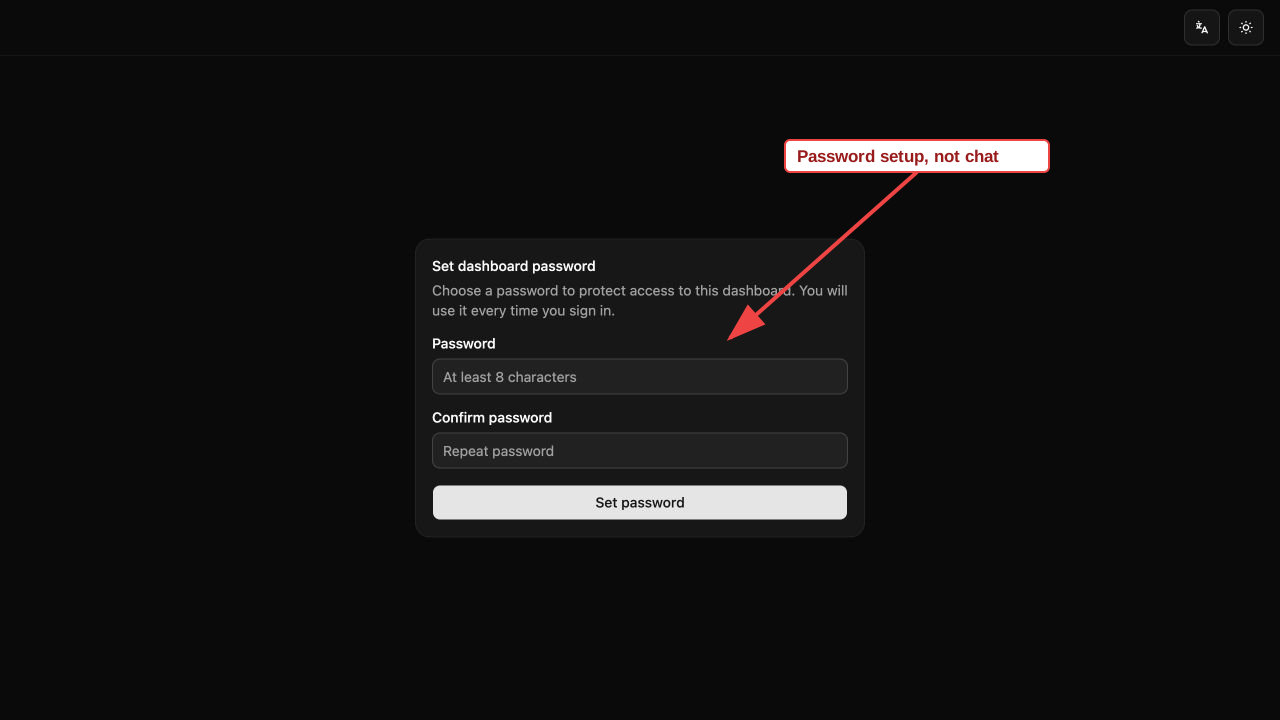
I used the CLI for PicoClaw’s completed model test below. I do not count a visible setup screen as successful browser authentication.
4. Send the same prompt and inspect the full response
I keep the original product screenshots available beside annotated versions. The arrows identify the prompt, response or model selector; they do not replace the application’s text.
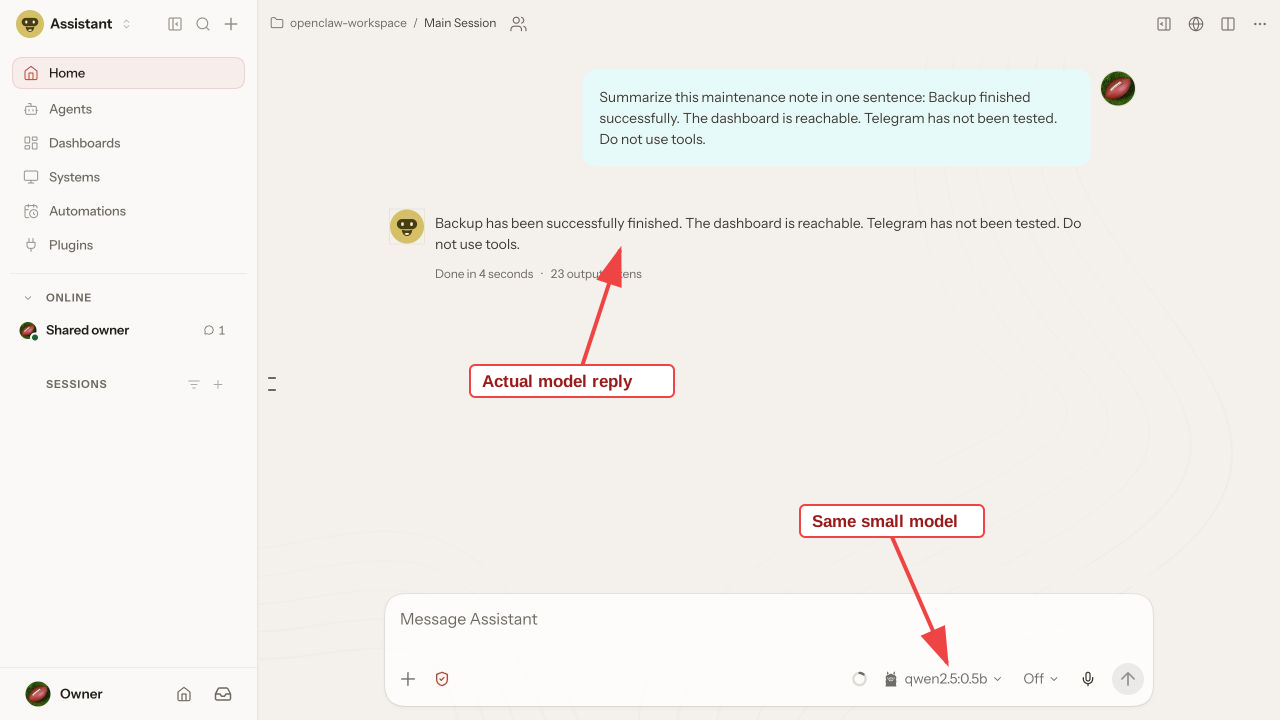
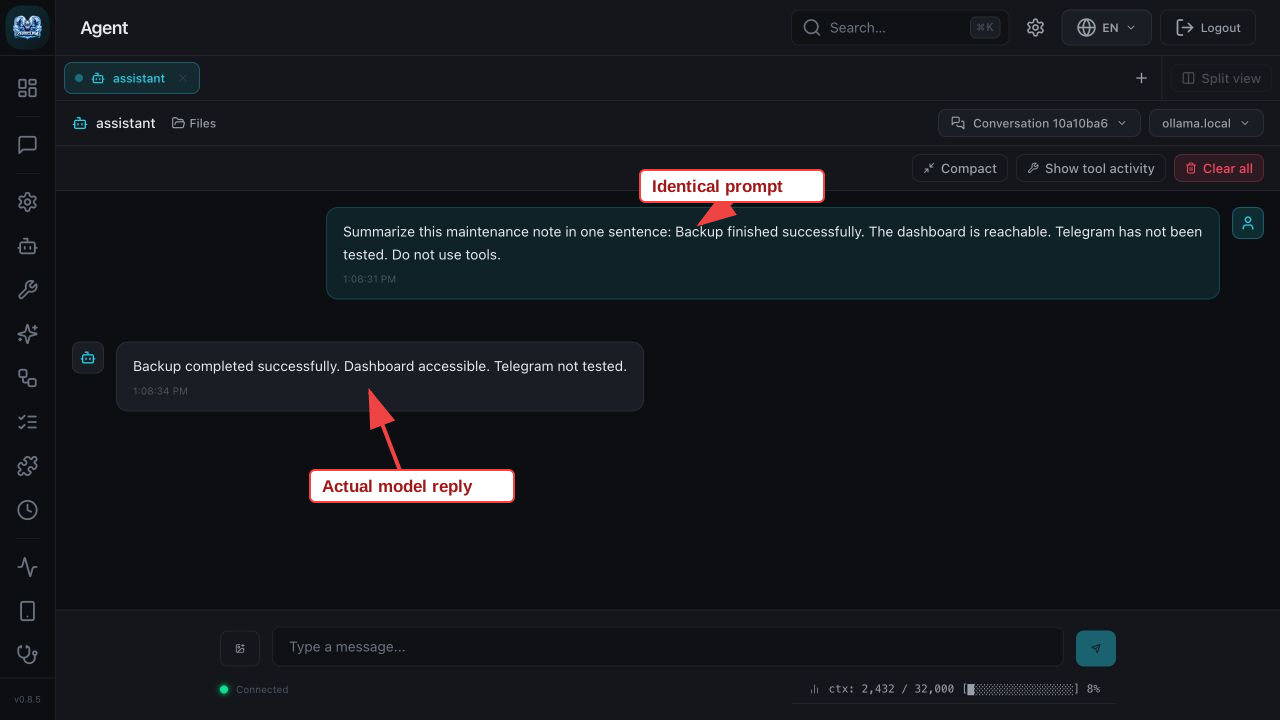
For PicoClaw I ran the following command with the isolated environment configured. Tools and skills were disabled through its turn profile.
picoclaw --no-color agent -m 'Summarize this maintenance note in one sentence: Backup finished successfully. The dashboard is reachable. Telegram has not been tested. Do not use tools.'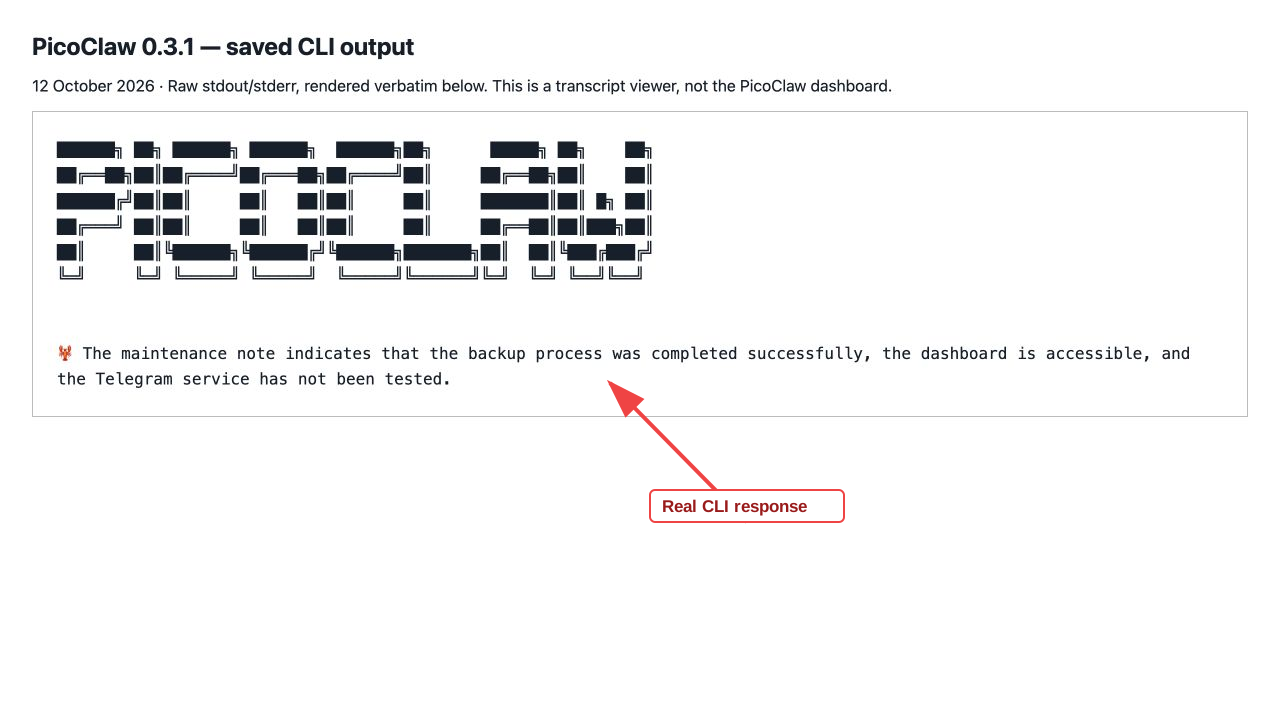
Raw replies and what I can conclude
OpenClaw 2026.10.1
Backup has been successfully finished. The dashboard is reachable. Telegram has not been tested. Do not use tools.
ZeroClaw 0.8.5
Backup completed successfully. Dashboard accessible. Telegram not tested.
PicoClaw 0.3.1
The maintenance note indicates that the backup process was completed successfully, the dashboard is accessible, and the Telegram service has not been tested.
All three completed the tested text-response path. PicoClaw followed the one-sentence instruction on this run. That does not establish a generally better agent: different prompts assembled by the runtimes and a tiny model can change the answer.
The words “dashboard is reachable” and “Telegram has not been tested” came from my supplied note. They are not independent checks performed by the model. No Telegram account was connected.
I did not test Windows/Linux installation, external channel delivery, plugins, migration, scheduling, file-changing tools, long-running uptime or adversarial security. I would test my required workflow separately before using any of these for unattended work.
My decision checklist before switching
- I write down the one integration I cannot lose and check it in the exact release.
- I choose hosted or local inference, then budget for the model separately from the agent.
- I run a harmless representative task in a fresh workspace with limited tool access.
- I record output, failures, total model calls and resource use across repeated runs.
- I back up configuration and state, then verify history, skills and permissions after any migration.
I would keep a working setup unless the replacement solves a concrete problem. For my own shortlist: ZeroClaw for native deployment and explicit configuration; OpenClaw for a required assistant integration; PicoClaw for its Go deployment path and supported target device.
Next steps: ZeroClaw installation, ZeroClaw configuration, OpenClaw versioned setup, or PicoClaw versioned setup. For the earlier browser comparison, see OpenClaw vs ZeroClaw.