OpenClaw vs ZeroClaw: which fits your setup?
Choose OpenClaw when its assistant workflows, channels and companion-device integrations match your needs. Choose ZeroClaw when you want a native Rust runtime with explicit agent and risk-profile configuration, and its available features cover your workflow.
Both connect models to tools and channels. Neither supplies a free language model, guarantees safe automation, or wins every workload by virtue of its implementation language.
Tested and updated .
Versions compared: OpenClaw 2026.10.1 and ZeroClaw 0.8.5. Both were listed as the latest stable releases by their official release APIs on the test date. The screenshots below show these releases running locally.
Who each suits
Consider OpenClaw if…
- You want a personal or shared assistant built around its Gateway and Control UI.
- You need a particular documented messaging channel, companion app or device-node workflow.
- You are comfortable maintaining its supported Node runtime, package and extensions.
Start with the integration you need and check its platform requirements. These are fit criteria, not a claim that every integration was tested here. OpenClaw project overview.
Consider ZeroClaw if…
- You prefer deploying a native executable for the core runtime.
- You want named agents with explicit provider, workspace and risk-profile settings in TOML.
- You can confirm your required channels and extensions exist in the release and build you install.
Evaluate it on your actual machine and workload. A native binary does not establish a minimum RAM requirement for a local model. ZeroClaw project overview.
Practical differences in these releases
Swipe the table sideways to compare both projects.
| Area | OpenClaw 2026.10.1 | ZeroClaw 0.8.5 |
|---|---|---|
| Installation | The tested npm release needs Node >=24.16.0 <25 or >=26.1.0. The official installer can provision a supported runtime. | The tested macOS arm64 release runs as a native Rust executable. Keep its packaged web assets for the dashboard; choose the asset for your platform. |
| Configuration | A JSON/JSON5 configuration connects the Gateway, agents, model providers and tools. | A schema-3 TOML configuration connects named agents, providers, risk profiles and channels. |
| Local models | The tested Ollama provider uses the native /api/chat API, with a base URL that omits /v1. | Our tested Ollama configuration uses the OpenAI-compatible chat route with native_tools = false. |
| Dashboard | The Control UI supported token authentication and a completed browser chat in our test. | The web dashboard supported pairing and a completed browser chat in our test. |
| Extensions | Skills and plugins are documented extension paths. Check each extension's dependencies and access before enabling it. | Native skill bundles work in the stock binary. Plugin-packaged skills and WASM plugins require a plugin-enabled build in v0.8.5. |
| Software license | MIT for the runtime; model and third-party service terms are separate. | MIT OR Apache-2.0 for the runtime; model and third-party service terms are separate. |
Source details: OpenClaw runtime requirement and license, OpenClaw Ollama configuration, ZeroClaw build and license, and ZeroClaw plugin-build restriction. The tested configs and dashboard observations inform the other rows.
Real test: the same task in both dashboards
We installed OpenClaw 2026.10.1 from npm with a temporary Node 24.16.0 runtime, and used the official ZeroClaw 0.8.5 macOS arm64 release archive. Both ran on the same Apple M3 machine with 8 GB memory. Each used a separate config and workspace, loopback-only gateway, and the same local Ollama 0.35.0 server with qwen2.5:0.5b.
We validated each configuration, authenticated through each browser UI, and sent this exact prompt:
Summarize this maintenance note in one sentence: Backup finished successfully. The dashboard is reachable. Telegram has not been tested. Do not use tools.
This is a connection and workflow test with a small model. The runtimes construct different system prompts and use different provider paths and context settings; it is not a controlled speed, memory or model-quality benchmark. OpenClaw had all tools denied for this test. ZeroClaw used the existing readonly sample with only its time tool allowed and no MCP servers; neither chat requested tools.
OpenClaw: authenticated chat returned model text
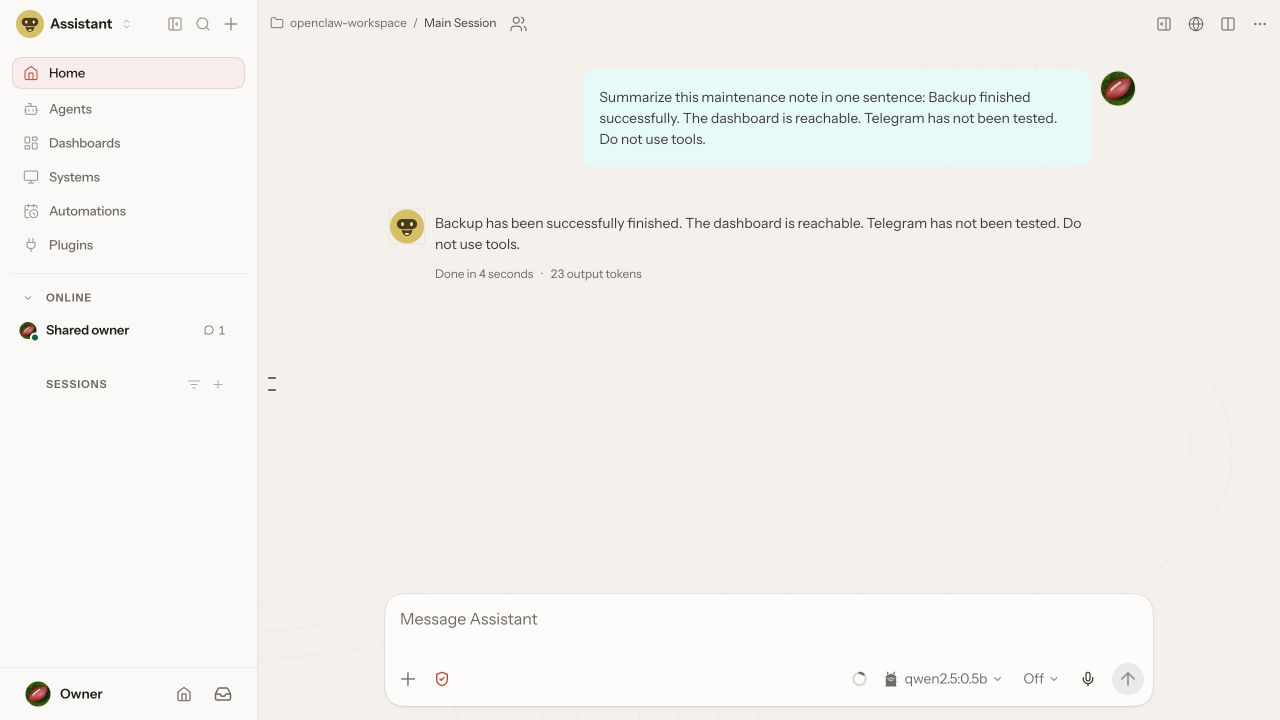
The reply was: “Backup has been successfully finished. The dashboard is reachable. Telegram has not been tested. Do not use tools.” It preserved the status information but used multiple sentences and repeated the tool instruction.
ZeroClaw: paired chat returned model text
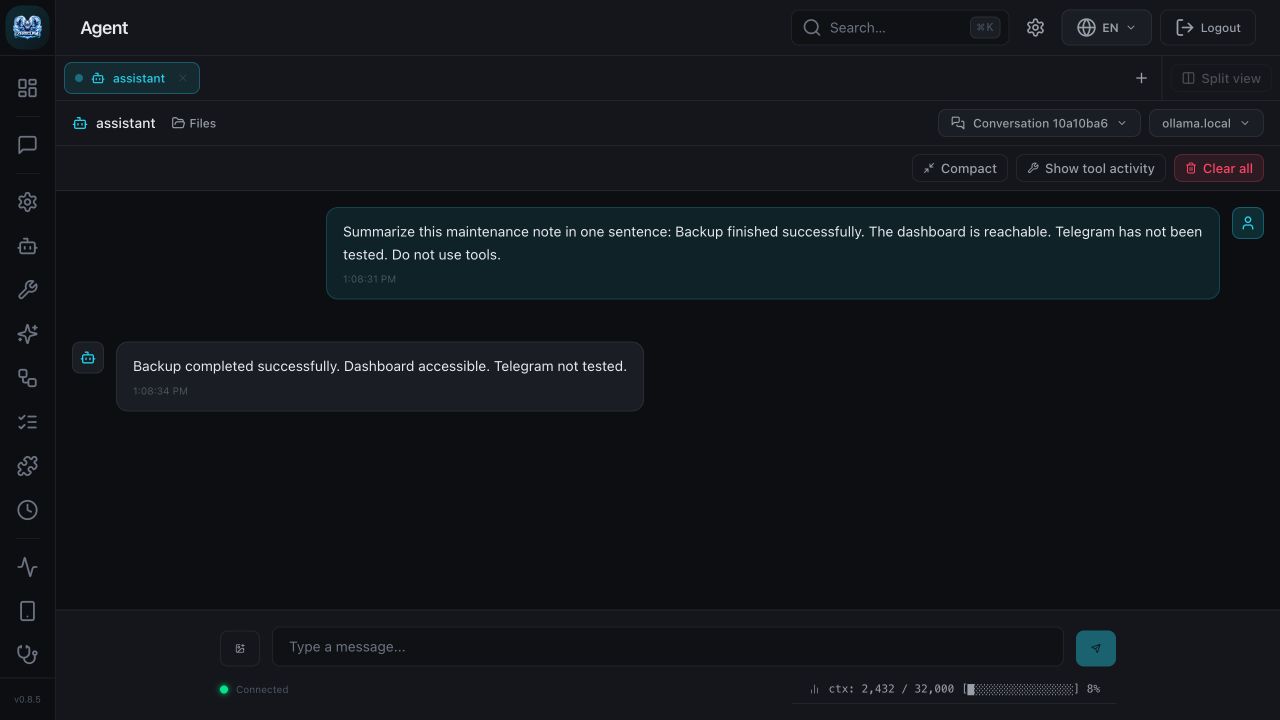
The reply was: “Backup completed successfully. Dashboard accessible. Telegram not tested.” It preserved the three status points but also missed the one-sentence instruction.
What this establishes: both installed releases could load our configurations, authenticate a local dashboard, reach the same model server and display a real response. It does not establish tool reliability, channel delivery, security resistance or a performance winner. The timing displayed inside a screenshot is that app’s single-run report, not a comparable benchmark result.
Limitations to check before choosing
OpenClaw
The npm route requires a supported Node version; this machine’s default Node 22.15.0 did not meet the release’s declared engine range, so we provisioned Node 24.16.0 separately. Budget for runtime and extension maintenance. Companion apps, device features and channels have their own prerequisites.
OpenClaw’s tagged documentation says main-session tools run on the host unless sandboxing is configured. Review tool access, pairing and sandbox settings for your use case. Its language or number of integrations does not by itself make it safer or less safe. OpenClaw security notes.
ZeroClaw
Build choices affect features. The official v0.8.5 prebuilt binary does not expose the plugin command; a plugin-enabled source build is needed for that path. Native shared skill bundles remain available. Keep the dashboard assets with your installation and verify the binary for your operating system and CPU. Tested skills and plugin guidance.
Risk profiles, approvals and workspace restrictions require correct configuration and do not prove every possible tool action is contained. Review the controls relevant to your selected build and operating system. ZeroClaw security overview.
Both: model cost, resources and migration
The runtime’s memory use excludes the separate local model server, weights, context and other tools. Hosted inference moves model computation to a provider, whose fees and limits still apply. Open-source runtime licenses do not include hosted model credits or eliminate local hardware and electricity costs.
Measure peak usage on a representative task before selecting hardware. We did not run a normalized resource benchmark, so there is no universal “under 5 MB,” startup-speed multiplier or cheap-board guarantee here.
Do not assume configuration files, memory, skills or plugins transfer unchanged between projects. Back up your state and test provider settings, permissions, history and one required integration in a separate workspace before migrating. Our test did not cover migration, Windows/Linux, external messaging, companion apps or plugin execution.
Choose your next guide
- Trying ZeroClaw? Follow the installation guide, then run the tested minimal configuration.
- Trying OpenClaw? Follow its versioned installation and quick-start instructions, then the official getting-started guide. The live docs may describe a newer release.
- Already stuck? Use the ZeroClaw troubleshooting hub or OpenClaw’s troubleshooting guide, matching the instructions to your installed version.
ZeroClaw.net is an independent community resource. The recommendations above are editorial judgments based on the cited release documentation and the bounded local test.