Version notice — 8 October 2026: Verified against ZeroClaw v0.8.5. Security boundaries, autonomy levels, command policies, and sandboxing are configured under
[risk_profiles.<alias>]and per-agent workspace definitions, replacing legacy top-level[security]keys. Absolute safety claims have been replaced with tested runtime controls and actual enforcement limits.
An AI agent is a program that decides what to do next based on text it was given, and then does it. If that program can read files and execute commands, anyone who can influence that text can influence what runs on your host machine. This is not a hypothetical failure mode — it is the normal operating condition of every autonomous agent runtime.
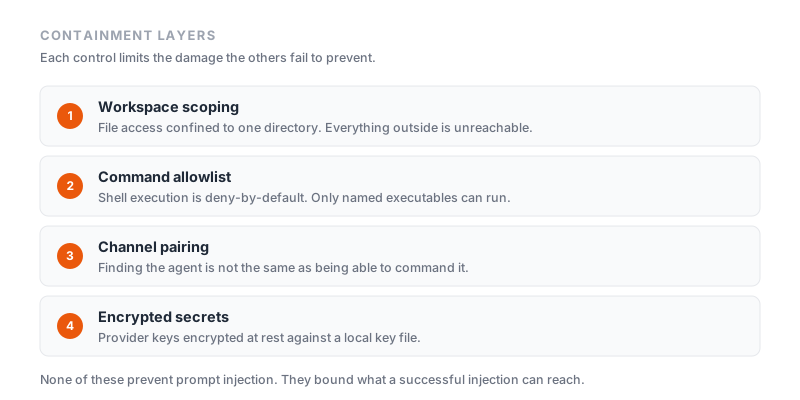
ZeroClaw's approach is layered containment: several independent controls, each of which limits the blast radius when others fail. This guide covers what each control does in ZeroClaw v0.8.5, how to configure it in config.toml, what each boundary genuinely prevents, and where its real limits lie.
The threat model
Before configuring anything, be clear about what you are defending against. There are three distinct risks:
- The agent makes an inference error. The model misreads an instruction and attempts to delete or overwrite the wrong directory. No malice is involved, just a faulty inference executed with actual system permissions.
- Unauthorized access to an agent endpoint. Your gateway or bot is discovered by an unauthorized party. Anyone who reaches it can issue tasks unless strong authentication blocks them.
- Prompt injection. The agent reads a webpage, an email, or a document containing adversarial text crafted to look like instructions. Frontier models cannot reliably distinguish data they were asked to process from instructions they were asked to follow.
The goal of ZeroClaw's security model is not an agent that can never be tricked. It is an agent whose worst possible day is strictly bounded and survivable.
Control 1: Workspace scoping and forbidden paths
Workspace scoping restricts filesystem tool operations to a specific folder hierarchy.
[agents.assistant.workspace]
path = "/var/zeroclaw/workspace"
unrestricted_filesystem = false

[risk_profiles.hardened]
workspace_only = true
When workspace_only = true is enabled on the active risk profile, ZeroClaw's internal file tools (file_read, file_write, file_list) resolve relative paths against the workspace and verify that canonicalized paths do not escape the designated directory tree.
Built-in forbidden paths
In ZeroClaw v0.8.5, the runtime enforces an automatic denylist of sensitive operating system paths, regardless of whether workspace scoping is enabled:
[risk_profiles.hardened]
forbidden_paths = [
  "/etc",
  "/root",
  "~/.ssh",
  "~/.gnupg",
  "~/.aws",
  "~/.config"
]
On Windows, the default denylist blocks C:\Windows, C:\Program Files, ~/.ssh, ~/.aws, and similar system paths.
Realistic limits of filesystem scoping
Filesystem path checking is not an impenetrable OS container:
- Child process bypass: Workspace path validation applies to ZeroClaw's built-in file tools. If the agent is allowed to execute shell commands (
git,cargo,bash), those processes run under the host operating system user and can access any file that user can access — unless restricted by OS-level sandboxing (Control 4). - Network exfiltration: Workspace scoping bounds what files can be read; it does not restrict where read data can be sent. An agent with network access (
http_requestorcurl) can exfiltrate workspace contents. - Symlinks: Symlinks created inside the workspace pointing outside can create traversal vectors. ZeroClaw canonicalizes paths to detect symlink escapes, but nested archive extraction should still be supervised.
Control 2: Autonomy levels and approval gates
Autonomy is not a binary switch. In v0.8.5, autonomy is configured per risk profile via [risk_profiles.<alias>].level. Each agent references a profile via agents.<alias>.risk_profile = "<alias>".
The runtime accepts three distinct levels:
[risk_profiles.reader]
level = "readonly"      # "readonly", "supervised", or "full"
Note: The string is
readonlywithout an underscore. Usingread_onlyfails strict schema validation at startup.
1. readonly
The agent can inspect its environment but cannot produce persistent side effects. Allowed tools are strictly read-only: file_read, file_list, memory_search, http (GET only), web_search, and time. File writes, shell executions, and HTTP POSTs are blocked.
2. supervised (recommended default)
Actions are classified by risk score:
| Risk level | Operations | Runtime behavior |
|---|---|---|
| Low | file_read, memory_search, web_search, time, http GET | Executes automatically |
| Medium | file_write within workspace, allowed shell commands, http POST | Pauses and requests operator approval |
| High | Disallowed commands, writes outside workspace, high-risk flags | Blocked by default |
When a medium-risk action occurs, ZeroClaw sends an approval request over the active channel (such as an inline keyboard in Telegram, an interactive prompt in the CLI, or a session/request_permission JSON-RPC call in the Web UI/ACP).
- Timeout behavior: Unanswered approval requests expire after the channel's
approval_timeout_secs(default 120 seconds). Timeouts fail closed and are treated as explicit denials. - Cross-channel approval routing: You can route approvals to a dedicated operator channel instead of the initiating chat:
[risk_profiles.frontline.approval_route]
approver_channel = "matrix.ops"
3. full
The agent executes low, medium, and high-risk tool operations without prompting. workspace_only is relaxed, though forbidden_paths and kernel sandboxing remain active unless explicitly turned off (such as in YOLO mode). Use full only in disposable CI environments or trusted local development.
Control 3: Command allowlists and risk scoring
Shell command execution is deny-by-default. If an agent attempts to invoke a command not present in allowed_commands, the invocation is immediately rejected:
[risk_profiles.hardened]
allowed_commands = ["git", "ls", "cat"]
require_approval_for_medium_risk = true
block_high_risk_commands = true
shell_timeout_secs = 60
The limits of command allowlists
Allowlisting an executable allowlists everything that executable can execute:
gitcan trigger arbitrary script execution through git hooks and repository configuration (git config core.hooksPath).cargoandnpmexecute build scripts (build.rs) and lifecycle hooks (postinstall) defined in external project files.- Interpreters (
python,node,bash) provide complete shell escape capabilities. - Setting
allowed_commands = ["*"]completely removes command denylisting.
Start with an empty allowlist or restrict it to non-interpreting read tools (ls, cat, date). If build tools are required, back them up with kernel sandboxing and run ZeroClaw under a restricted operating system user.
Control 4: OS-level sandboxing (Landlock and Firejail)
To contain child processes executed by shell tools, ZeroClaw v0.8.5 integrates operating system kernel sandboxing:
[risk_profiles.hardened]
sandbox_enabled = true
sandbox_backend = "landlock"   # "landlock" (Linux) or "firejail"
- Landlock (Linux 5.13+): Uses the Linux kernel's Landlock LSM (Linux Security Module). It enforces unprivileged filesystem access restrictions directly on the child process, preventing spawned tools from reading files outside permitted directories even if the process runs as your user.
- Firejail: Wraps command execution inside Linux namespaces and seccomp filters, isolating filesystem access, network interfaces, and process tables.
Control 5: Action tracking and cost ceilings
Autonomous loops can run away if an agent gets trapped in a retry cycle. ZeroClaw limits operational velocity and financial spend:
[risk_profiles.hardened]
max_actions_per_hour = 20
max_cost_per_day_cents = 500   # $5.00 daily limit
- Action rate limiting: Tracks successful operations within a sliding one-hour window. If the agent exceeds 20 operations in an hour, subsequent actions are throttled.
- Cost ceiling: Tracks token spend against model provider pricing caches. When cumulative daily spend reaches 500 cents ($5.00), further inference calls are halted.
Control 6: Gateway and channel pairing
To prevent unauthorized parties from sending instructions to your agent:
- Pairing required by default: The gateway listener (
[gateway] require_pairing = true) requires a one-time 8-character pairing code to authorize any browser or API client. - Public bind protection: The gateway binds to
127.0.0.1:42617. Settinghost = "0.0.0.0"is rejected at startup unlessallow_public_bind = trueis explicitly configured. - Remote admin lock: Administrative endpoints such as reload and shutdown reject non-loopback connections unless
allow_remote_admin = trueand valid pairing credentials are provided.
Control 7: Encrypted secret storage
API keys are encrypted at rest using local machine keyfiles:
zeroclaw quickstart
Credentials stored in configuration files are encrypted before writing to disk, protecting against accidental exposure in git commits or public backup archives.
Realistic limit: The decryption key lives on the host filesystem so the unattended service can restart. Anyone with read access to the user's filesystem can decrypt the secrets. Defense-in-depth requires file permission restrictions (chmod 700 ~/.zeroclaw) and provider-side budget caps.
Control 8: WebAssembly plugin sandboxing
ZeroClaw plugins compile to WebAssembly components (wasm32-wasip2) executed in Wasmtime:
- Deny-by-default capabilities: Plugins possess zero ambient authority. They cannot open sockets or access filesystem directories unless explicitly declared in the plugin's
manifest.tomland approved by the operator. - Integrity and authenticity: Plugin installation checks transport integrity via SHA-256 and verifies author authenticity using Ed25519 digital signatures.
A tested hardened security policy
Here is a tested, schema-3-compliant configuration implementing these controls:
schema_version = 3

[providers.models.ollama.local]
model = "qwen2.5:0.5b"
uri = "http://127.0.0.1:11434"
temperature = 0.0
num_ctx = 4096
num_predict = 128
native_tools = false

[agents.assistant]
model_provider = "ollama.local"
risk_profile = "hardened"

[agents.assistant.workspace]
path = "/var/zeroclaw/workspace"
unrestricted_filesystem = false

[risk_profiles.hardened]
level = "supervised"
workspace_only = true
allowed_commands = ["git", "ls", "cat"]
forbidden_paths = [
  "/etc",
  "/root",
  "~/.ssh",
  "~/.gnupg",
  "~/.aws",
  "~/.config"
]
require_approval_for_medium_risk = true
block_high_risk_commands = true
max_actions_per_hour = 20
max_cost_per_day_cents = 500
shell_timeout_secs = 60
allowed_tools = ["file_read", "file_list", "time", "memory_search"]
excluded_tools = ["shell"]
sandbox_enabled = true
You can download this tested file directly: zeroclaw-v0.8.5-hardened-security.toml.
Verify the policy against your installed ZeroClaw binary before starting the agent:
zeroclaw --config-dir /path/to/config config migrate --json
Defense-in-depth outside ZeroClaw
The runtime controls above must be reinforced by host-level defenses:
- Run as a dedicated, unprivileged user: Run ZeroClaw under a service user (
zeroclaw) that owns only the agent workspace directory and has no sudo privileges. This OS user boundary is the backstop the model cannot negotiate around. - Restrict outbound network traffic: If the agent only requires access to a local Ollama instance or a specific model API, block all other outbound network traffic using host firewall rules (
nftablesorpfctl). - Store backups outside the workspace: Ensure system backups and configuration archives reside on storage inaccessible to the agent user.
- Review audit logs: Regularly inspect the runtime logs (
zeroclaw-events.jsonlorgateway.log) for unexpected tool calls or approval denials.
What none of this fixes
Prompt injection is an architectural property of Large Language Models. When an agent processes untrusted external content (such as internet search results, customer emails, or parsed documents), that content can guide model decisions.
The fundamental rule of agent security: never grant an autonomous agent a capability whose worst-case execution you cannot afford. If an agent has the ability to send emails or delete database records, assume that untrusted input could eventually trigger that behavior. Build your containment boundaries with that assumption in mind.
Related reading
- ZeroClaw config.toml reference — complete schema 3 reference guide
- ZeroClaw Web UI and gateway guide — safe gateway exposure and pairing controls
- Installing ZeroClaw — installation verification and build integrity
- Official ZeroClaw autonomy guide