Version checked — 7 October 2026: This guide targets ZeroClaw v0.8.5, the latest release checked today. The macOS Apple Silicon prebuilt route was tested from download and checksum verification through a real local-model reply. Windows and Ubuntu commands were checked against the release assets and tagged source; they were not executed on those operating systems.
Choose the route for your machine. The prebuilt CLI archives do not require Rust. This is an independent guide; download the software from the official project.
Choose your install route
| Platform | Start with | Verification here |
|---|---|---|
| Windows 10 / 11, x64 | Prebuilt ZIP | Asset, ZIP contents and checksum checked; Windows execution not tested |
| Ubuntu, x86-64 | Linux release archive | Release asset and tagged install documentation checked |
| macOS, Apple Silicon | macOS release archive | Download, extraction, version, config and local-model response tested |
| macOS, Intel | Same steps with the Intel archive | Asset checked; Intel execution not tested |
| Custom build | Pinned source | Commands checked against the tagged repository |
| Docker / Android | Other platforms | Follow the official platform guide; not tested here |
Windows prebuilt: no Rust required
Use PowerShell, not Command Prompt, for these commands. This route installs the x64 CLI ZIP, rather than the desktop MSI or EXE. See the official v0.8.5 Windows guide for other options.
1. Download and check the ZIP
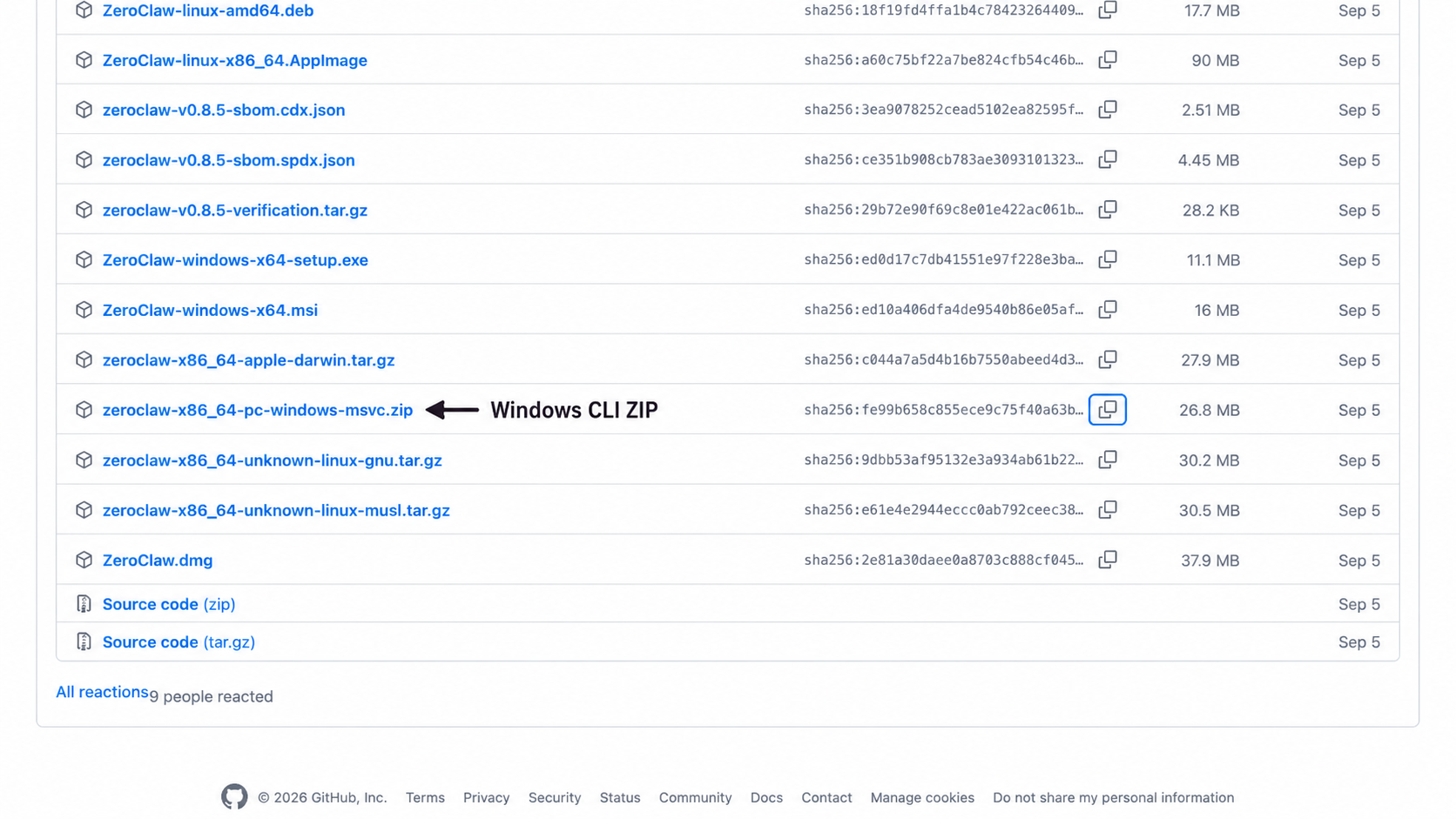
Open the v0.8.5 release assets and choose zeroclaw-x86_64-pc-windows-msvc.zip, or download it in PowerShell:
$ErrorActionPreference = "Stop"
$version = "0.8.5"
$asset = "zeroclaw-x86_64-pc-windows-msvc.zip"
$zip = "$env:TEMP\zeroclaw-v$version.zip"
$url = "https://github.com/zeroclaw-labs/zeroclaw/releases/download/v$version/$asset"
Invoke-WebRequest -Uri $url -OutFile $zip
$expected = "fe99b658c855ece9c75f40a63bc6defac1f766b1c3ede9a041efc3e48b21d0e0"
$actual = (Get-FileHash -Path $zip -Algorithm SHA256).Hash.ToLowerInvariant()
if ($actual -ne $expected) { throw "Checksum mismatch. Do not extract or run this download." }
Write-Output "Checksum OK: $asset"
The expected hash is the v0.8.5 ZIP entry in the official SHA256SUMS. If you select another release, use that release's filename and checksum together.
2. Extract and make the CLI available
$dst = "$env:USERPROFILE\.zeroclaw\bin"
New-Item -ItemType Directory -Force -Path $dst | Out-Null
Expand-Archive -Path $zip -DestinationPath $dst -Force
$userPath = [Environment]::GetEnvironmentVariable("Path", "User")
if (($userPath -split ";") -notcontains $dst) {
    [Environment]::SetEnvironmentVariable("Path", "$dst;$userPath", "User")
}
if (($env:Path -split ";") -notcontains $dst) { $env:Path = "$dst;$env:Path" }
zeroclaw --version
Expected output:
zeroclaw 0.8.5
The PATH update applies to this terminal and future user terminals. For an existing installation, stop the running ZeroClaw process before overwriting its binary. If the command is not found, try & "$dst\zeroclaw.exe" --version to distinguish a PATH problem from an extraction problem.
3. Create your first agent
zeroclaw quickstart
Choose your model provider and an agent alias, then follow the setup prompts. A hosted provider needs your own credentials; a local Ollama provider needs a running Ollama server and a downloaded model. After setup, replace assistant below with the alias you chose:
zeroclaw agent -a assistant -m "Hello"
Expect a model reply, not a fixed sentence. The CLI requires -a; there is no default agent. The minimal config guide gives a credential-free local test instead of the wizard.
Ubuntu and Debian prebuilt
For an x86-64 Ubuntu machine, download the Linux GNU archive. On ARM64 use zeroclaw-aarch64-unknown-linux-gnu.tar.gz instead; do not use an x86-64 binary on ARM.
mkdir -p zeroclaw-download
cd zeroclaw-download
release="https://github.com/zeroclaw-labs/zeroclaw/releases/download/v0.8.5"
asset="zeroclaw-x86_64-unknown-linux-gnu.tar.gz"
curl -fL "$release/$asset" -o "$asset"
curl -fL "$release/SHA256SUMS" -o SHA256SUMS
awk -v file="$asset" '$2 == file { print }' SHA256SUMS > selected.sha256
test -s selected.sha256 && sha256sum -c selected.sha256
Proceed only if the checksum command succeeds and prints the archive name followed by OK. Then:
tar -xzf "$asset"
install -Dm755 zeroclaw "$HOME/.local/bin/zeroclaw"
export PATH="$HOME/.local/bin:$PATH"
zeroclaw --version
zeroclaw quickstart
Expected version: zeroclaw 0.8.5. The PATH export lasts for this terminal; add $HOME/.local/bin to your shell profile if it is not already there. This route downloads a binary and does not need a Rust compiler. For distribution dependencies and service setup, see the tagged Linux guide.
macOS prebuilt: tested end to end
On Apple Silicon, use the aarch64-apple-darwin archive. For Intel, change only asset to zeroclaw-x86_64-apple-darwin.tar.gz.
mkdir -p zeroclaw-download
cd zeroclaw-download
release="https://github.com/zeroclaw-labs/zeroclaw/releases/download/v0.8.5"
asset="zeroclaw-aarch64-apple-darwin.tar.gz"
curl -fL "$release/$asset" -o "$asset"
curl -fL "$release/SHA256SUMS" -o SHA256SUMS
awk -v file="$asset" '$2 == file { print }' SHA256SUMS > selected.sha256
test -s selected.sha256 && shasum -a 256 -c selected.sha256
Expected checksum output:
zeroclaw-aarch64-apple-darwin.tar.gz: OK
Only after that check succeeds:
tar -xzf "$asset"
mkdir -p "$HOME/.local/bin"
install -m755 zeroclaw "$HOME/.local/bin/zeroclaw"
export PATH="$HOME/.local/bin:$PATH"
zeroclaw --version
Observed output on macOS arm64:
zeroclaw 0.8.5
For setup, run zeroclaw quickstart, or use the tested minimal Ollama config. Our end-to-end check used the official binary in a temporary install directory, that config, Ollama 0.35.0, and qwen2.5:0.5b. A temporary endpoint override used port 11435 to keep the test separate from a normal Ollama server on 11434.
zeroclaw agent -a assistant -m "Reply with the single word Ready. Do not use tools."
Observed reply:
Ready.
This verifies installation, config loading and a real model response. It does not test every tool, Telegram, services, or other platforms. Model wording may vary. Keep $HOME/.local/bin in your shell profile for future terminals.
Build from source
Use this when you need a custom feature set. A prebuilt install does not need the build tools below. The v0.8.5 source declares a Rust 1.96 minimum; its release builders use Rust 1.98.
git clone --branch v0.8.5 --depth 1 https://github.com/zeroclaw-labs/zeroclaw.git
cd zeroclaw
cargo install --locked --path .
zeroclaw --version
zeroclaw quickstart
Ubuntu source builds need a compiler/linker and the dependencies in the official Linux guide. Windows source builds need Rust and Visual Studio C++ Build Tools. cargo install does not configure your shell's PATH; ensure Cargo's bin directory is available. Pinning the Git tag makes this route reproducible; an unpinned clone follows newer code.
The upstream Unix installer is now install.sh, and the first-run command is quickstart. For the guided installer, use ./install.sh inside the tagged checkout. For Homebrew and other package managers, check zeroclaw --version before using these v0.8.5 config examples; a package can lag the release.
Docker and Android
For containers, use the v0.8.5 container guide and the official image ghcr.io/zeroclaw-labs/zeroclaw:v0.8.5. Its data path and networking differ from a native install; do not reuse a native workspace mount without checking that guide.
The release includes zeroclaw-aarch64-linux-android.tar.gz. Android is an experimental release target. Use the tagged Android guide and check device architecture and Termux requirements before trying it. Neither container nor Android execution was tested for this article.
Check your installation and config
zeroclaw --version
zeroclaw status
zeroclaw config migrate --json
zeroclaw doctor
The version must match the guide. status shows the config location and agent/provider summary. config migrate --json checks the file through the strict migration/parser path and upgrades older supported schemas on disk, creating a backup when migration occurs. Review the result; valid: true on an already-current file confirms parsing, not that your provider responds or every alias resolves. Run a real agent message for that check.
doctor is a runtime diagnostic. A fresh CLI-only install may report a stopped daemon, missing heartbeat state or no configured messaging channels. Those findings do not mean the binary install failed, and doctor is not an exhaustive unknown-key validator.
Common problems
Command not found. Check the install directory and PATH. On Windows, try the full zeroclaw.exe path; on Unix, try $HOME/.local/bin/zeroclaw --version. Open a new terminal after persistent PATH changes.
Wrong architecture or checksum failure. Match the archive to uname -m on Unix or your Windows system architecture. Redownload from the same tagged release and stop if its checksum still differs.
Old onboarding commands fail. zeroclaw onboard is deprecated in v0.8.5; use zeroclaw quickstart. Old onboard --channels-only instructions do not apply to this release.
Agent alias required or provider reference missing. Use zeroclaw agent -a assistant, with an alias that exists under [agents.assistant]. Check that model_provider names a configured provider alias and risk_profile names a configured profile.
Ollama connection refused or model missing. Start Ollama, run ollama pull qwen2.5:0.5b, and make sure the provider uri points to the server. Check ollama list before retrying. A server in a container is not the same host as your CLI.
Config appears to load but uses defaults. The runtime has a resilient loading path. Use zeroclaw config migrate --json, compare keys with zeroclaw config schema, and inspect status. Do not assume an unknown old field was applied.