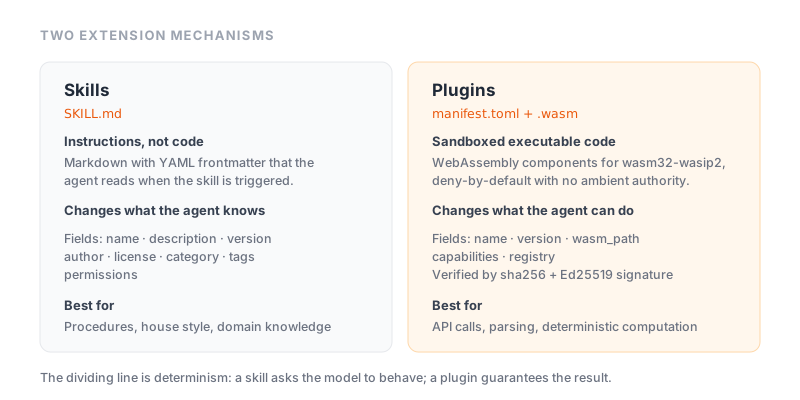
ZeroClaw has two extension mechanisms with similar-sounding names and entirely different characters. Getting them confused leads to a lot of wasted time, so the distinction is worth stating up front:
- Skills are instructions. A folder containing a Markdown file that tells the agent how to approach a particular kind of task. No code runs. They change what the agent knows.
- Plugins are code. WebAssembly components that execute in a sandbox with explicitly granted capabilities. They change what the agent can do.
If your extension needs to make a network call, parse a binary format or perform a computation, you need a plugin. If it needs to encode a procedure, a house style or a checklist, you need a skill — and a skill is dramatically easier to write.
Skills
What a skill is
A skill is a directory containing a SKILL.md file and a README.md. The SKILL.md carries YAML frontmatter describing the skill, followed by the instructions the agent reads when the skill is triggered.
skills/my-skill/
├── SKILL.md        # Required: metadata and instructions
└── README.md       # Required: user-facing documentation
The folder name must match the name field in the frontmatter. This trips people up constantly — rename the folder, forget the frontmatter, and the skill silently fails to load.
ZeroClaw's skill format follows the agentskills.io open specification, which means skills are not necessarily locked to one runtime.
The SKILL.md frontmatter
The required fields:
| Field | Purpose |
|---|---|
name | Lowercase with hyphens, matching the folder name |
description | What the skill does and when to trigger it |
version | Semantic version, as a quoted string |
author | GitHub username |
license | An SPDX identifier from the approved list |
category | One of nine predefined categories |
tags | Trust tier — Official or Community — plus optional extras |
permissions | Array of capabilities the skill requires |
A minimal example:
---
name: changelog-writer
description: Use when the user asks for a changelog or release notes from a
  range of git commits. Groups commits by type and writes user-facing summaries.
version: "1.0.0"
author: your-github-username
license: MIT
category: development
tags:
  - Community
  - git
permissions:
  - read_files
---

# Changelog Writer

When invoked, follow this process:

1. Determine the commit range. If the user did not specify one, use commits
   since the most recent tag.
2. Read the commit messages. Do not read the diffs unless a message is
   uninformative on its own.
3. Group commits into Added, Changed, Fixed and Removed.
4. Rewrite each entry from the user's perspective, not the developer's.
   "Fixed null deref in auth handler" becomes "Fixed a crash when signing in
   with an expired session".
5. Omit purely internal changes — refactors, test updates, formatting.
Writing the description field
The description is the most important field and the one most often written badly, because it does double duty: it documents the skill for humans and it is how the agent decides whether the skill applies to the current request.
A description like "Writes changelogs" gives the agent nothing to match on. A description that names the trigger conditions — when the user asks for a changelog or release notes from a range of git commits — tells it exactly when to reach for this skill. Write the description as an answer to "when should this be used?", not "what is this?".
Permissions
The permissions array declares what the skill needs. Requesting broad permissions for a narrow task is the clearest signal of a poorly written — or hostile — skill. The registry's automated checks scan for dangerous permission combinations during review, but the check that matters is you reading the array before installing.
Installing skills
zeroclaw skills install <skill-name>
Skills come from the official registry at zeroclaw-labs/zeroclaw-skills, which validates every contribution through automated CI checks covering structure, secret scanning and dangerous permission combinations. Contributions are pull requests adding a skill folder and registering it in registry.json.
Automated validation catches structural problems and obvious hazards. It does not evaluate whether the instructions inside are good, correct or well-intentioned. A skill is text your agent will follow — read it before installing it, the same way you would read a shell script before running it.
Plugins
What a plugin is
Plugins are WebAssembly components built for wasm32-wasip2 against the WIT world tool-plugin. They run sandboxed and deny-by-default: the host grants only the capabilities declared in the plugin's manifest.toml.
This is a genuinely strong isolation model, and better than the plugin architecture of most comparable tools. A conventional native plugin is a shared library loaded into the host process with the host's full privileges — installing one means trusting its author completely, because nothing constrains what it does once loaded. A WASM component has no ambient authority at all. It cannot open a file, make a network request or read an environment variable unless that capability was explicitly granted, and the sandbox enforces this at the runtime level rather than by convention or good manners.
The plugin manifest
name = "redact-text"
version = "0.1.0"
wasm_path = "target/wasm32-wasip2/release/redact_text.wasm"
capabilities = []
registry = true
name— kebab-case, describing what the plugin does.version— the plugin version.wasm_path— the compiled component's location.capabilities— everything the host must grant. An empty array means a pure computation with no access to anything.registry— an optional boolean gating publication to the public registry.
Manifests may also declare provides and sender_match values.
The capabilities array is what you read before installing. An empty array is the strongest possible statement: the plugin transforms input into output and can do nothing else. The official redact-text plugin — which strips secrets and PII such as email addresses, bearer tokens and API keys from text — is exactly this shape, which is what makes it safe to run over sensitive content.
Conversely, a plugin that formats dates but requests network access is either badly built or doing something it has not told you about.
Plugin project layout
plugins/<name>/
  ├── Cargo.toml
  ├── src/lib.rs
  ├── src/<core>.rs
  ├── tests/
  ├── manifest.toml
  └── README.md
wit/v0/
registry.json
tools/build-registry.py
The wit/v0/ directory holds the WIT interface definitions the component is built against, and registry.json is the registry index.
Installing plugins
zeroclaw plugin install redact-text
zeroclaw plugin install redact-text@0.1.0
Pinning a version is the better habit for anything running unattended — an unpinned install means a future release changes behaviour without you deciding to accept it.
Installation verifies two distinct things. The CLI downloads the archive and checks its sha256 digest, which proves transport integrity: the bytes arrived intact and were not corrupted or substituted in transit. The host then enforces the configured Ed25519 signature, which proves authenticity: the package was produced by the key it claims. Integrity and authenticity are different properties, and a system that checks only the hash is trusting whoever published the hash.
Which one do you need?
| Need | Use |
|---|---|
| Encode a procedure or house style | Skill |
| Give the agent domain knowledge | Skill |
| Standardise output formatting | Skill |
| Call an external API | Plugin |
| Parse a binary or proprietary format | Plugin |
| Perform deterministic computation | Plugin |
| Transform data with guaranteed behaviour | Plugin |
The dividing line is determinism. A skill asks the model to behave a certain way, and the model may or may not comply perfectly — it is an instruction, not a guarantee. A plugin executes code and produces the same output for the same input every time.
For anything where "usually correct" is not good enough — financial calculations, data validation, redaction of sensitive content — write a plugin. For anything where judgement is the point, write a skill.
Writing your own
Start with a skill, even if you eventually want a plugin. A SKILL.md takes fifteen minutes and tells you whether the idea works at all. If it does and you find the model's inconsistency is the limiting factor, that is the signal to port the deterministic parts to a plugin.
Keep skills narrow. A skill that handles one task well is triggered reliably; a skill that handles nine loosely related tasks is triggered unpredictably, because its description cannot describe a coherent trigger condition. Nine focused skills beat one broad one.
Test the trigger, not just the content. The most common failure of a working skill is that it never fires — the description does not match how users actually phrase the request. Try several phrasings and see whether the agent reaches for it.
Security considerations
Skills and plugins are third-party content that influences or executes on your machine. Before installing either:
- Read the
permissionsarray orcapabilitieslist and ask whether each entry is genuinely needed for the stated purpose. - Read the instructions in
SKILL.md. It is text your agent will follow. - Prefer the
Officialtrust tier for anything touching sensitive data. - Pin plugin versions in unattended deployments.
- Remember that skills and plugins operate inside your configured workspace scoping and command allowlist — those boundaries still apply, and they are your backstop when an extension turns out to be more ambitious than advertised.
Related reading
- ZeroClaw security — the permission model these extensions operate within
- config.toml reference — configuring the tools skills and plugins use
- What is ZeroClaw? — how extensions fit the wider architecture